

TL;DR#
Samsung OEM NVMe SSD (which was a secondary SSD and not the boot volume) seems to be overheating after waking up from a system suspend/sleep on Windows / Linux. Found out that it was due to the SSD being stuck on PS0 state, wrote systemd service (or change the Link State Power Management on Windows) to fix. Scroll to end for solution.
Context#
The laptop in question is a Lenovo LOQ Gen 9.
The SSD in question is a SAMSUNG MZAL8512HDLU-00BL2.
Here is the SMART info from smartctl:
Model Number: SAMSUNG MZAL8512HDLU-00BL2Serial Number: S77MNF1X408866Firmware Version: 6L1QKXD7PCI Vendor/Subsystem ID: 0x144dIEEE OUI Identifier: 0x002538Total NVM Capacity: 512,110,190,592 [512 GB]Unallocated NVM Capacity: 0Controller ID: 1NVMe Version: 2.0The Temperature Sensor 1 on smartctl refers to the ASIC controller, while the Temperature Sensor 2 refers to the NAND Flash Memory Chip Temps.
The Issue#
For a brief while, I have noticed that my non-boot SSD was seemingly extremely hot (to the point where I could feel the heat through the laptop keyboard) after a system sleep.
This issue seemingly happened after I switched this SSD to a non-boot, i.e. a secondary SSD. This SSD was also not mounted on Linux, but was mounted on Windows.
When the system is woken up after a suspend, this is the temp info:
=== START OF SMART DATA SECTION ===SMART overall-health self-assessment test result: PASSED
SMART/Health Information (NVMe Log 0x02, NSID 0x1)Critical Warning:                   0x00Temperature:                        41 Celsius...Warning  Comp. Temperature Time:    0Critical Comp. Temperature Time:    0Temperature Sensor 1:               83 CelsiusTemperature Sensor 2:               47 CelsiusThermal Temp. 1 Transition Count:   1
Error Information (NVMe Log 0x01, 16 of 64 entries)No Errors Logged
Also, I have not tested if this is due to the OEM NVMe specifically, or if it’s common for all SSDs on Lenovo boards. I’m fairly sure the issue started when I went from a single-SSD setup to two SSDs - the boot volume moved to a separate drive, and the drive now overheating is the secondary, non-boot one.
Rebooting fixes the temps temporarily (until the next suspend ofc).
Root Cause & Debugging#
For finding the power state of your SSD, run: nvme get-feature /dev/nvmeX -f 0x02 -H.
- Running it normally (i.e. before suspend) should give you an output:
$ sudo nvme get-feature /dev/nvme1 -f 0x02 -H
get-feature:0x02 (Power Management), Current value:0x00000004 Workload Hint (WH): 0 - No Workload Power State (PS): 4- But after suspend/resume cycle, it should give an output:
$ sudo nvme get-feature /dev/nvme1 -f 0x02 -H
get-feature:0x02 (Power Management), Current value:00000000  Workload Hint (WH): 0 - No Workload  Power State   (PS): 0
Notice the Power State reporting 0 - the state with the highest power draw (~9W lmao) - after the suspend.
It seems that the firmware pins the power state at 0 for some reason after waking up from suspend, when the volume is not even mounted (zero usage).
The solution!#
Linux:#
Since this is a firmware side bug, we can only workaround this by forcing PS4 after the system wakes up.
#!/usr/bin/env bashset -euo pipefail
TAG="nvme-ps4-fix"log_info() { echo "$*" | systemd-cat -t "$TAG" -p info; }log_err() { echo "$*" | systemd-cat -t "$TAG" -p err; }
SERIAL="<your_nvme_serial>"
TARGET_PS="4"
get_ps() { nvme get-feature "$1" -f 0x02 -H 2>/dev/null | awk '/Power State/{print $NF; exit}'}
# Wait up to ~5s for NVMe sysfs to settle after resumefor outer in $(seq 1 25); do for c in /sys/class/nvme/nvme*; do [ -r "$c/serial" ] || continue
# NVMe strings can be space padded s="$(tr -d ' \n' < "$c/serial")" [ "$s" = "$SERIAL" ] || continue
dev="/dev/$(basename "$c")"
cur_ps="$(get_ps "$dev" || true)" [ -n "$cur_ps" ] || cur_ps="unknown"
if [ "$cur_ps" = "$TARGET_PS" ]; then log_info "matched serial=$SERIAL dev=$dev; already in PS$TARGET_PS" exit 0 fi
new_ps="unknown"
# Try to set PS4 (retry; resume can be racy) for i in $(seq 1 10); do nvme set-feature "$dev" -f 0x02 -V 0x4 >/dev/null 2>&1 || true
new_ps="$(get_ps "$dev" || true)" [ -n "$new_ps" ] || new_ps="unknown"
if [ "$new_ps" = "$TARGET_PS" ]; then log_info "matched serial=$SERIAL dev=$dev; PS $cur_ps -> $new_ps" exit 0 fi
sleep 0.2 done
log_err "matched serial=$SERIAL dev=$dev; failed to confirm PS4 (was PS=$cur_ps, now PS=$new_ps)" exit 0 done
sleep 0.2done
log_err "no NVMe controller found with serial=$SERIAL"exit 0and the systemd service:
[Unit]Description=Force NVMe back into PS4 after resumeDefaultDependencies=noStopWhenUnneeded=yesBefore=sleep.target
[Service]Type=oneshotRemainAfterExit=yesExecStart=/bin/trueExecStop=/usr/local/sbin/nvme-ps4-fix
[Install]WantedBy=sleep.targetYou need to have nvme-cli installed. SERIAL comes from the nvme list command.
Enable the service with: sudo systemctl enable --now nvme-ps4-fix.service.
For NixOS users :)
{ config, pkgs, lib, ... }:
let cfg = config.hardware.SsdApstFix;in{ options.hardware.SsdApstFix = { serial = lib.mkOption { type = lib.types.nullOr lib.types.str; default = null; description = "Serial number of the NVMe drive to apply the PS4 resume fix to."; }; };
config = lib.mkIf (cfg.serial != null) { environment.systemPackages = [ pkgs.nvme-cli ];
# NixOS provides a really nice way to write post-resume hooks. powerManagement.resumeCommands = let nvmeFix = pkgs.writeShellScript "ssd-force-ps4-on-resume" '' set -euo pipefail
export PATH=${lib.makeBinPath [ pkgs.coreutils pkgs.gawk pkgs.nvme-cli pkgs.systemd ]}
TAG="nvme-ps4-fix" log_info() { echo "$*" | systemd-cat -t "$TAG" -p info; } log_err() { echo "$*" | systemd-cat -t "$TAG" -p err; }
SERIAL=${lib.escapeShellArg cfg.serial} TARGET_PS="4"
get_ps() { nvme get-feature "$1" -f 0x02 -H 2>/dev/null | awk '/Power State/{print $NF; exit}' }
# Wait up to ~5s for NVMe sysfs to settle after resume for outer in $(seq 1 25); do for c in /sys/class/nvme/nvme*; do [ -r "$c/serial" ] || continue
# NVMe strings can be space padded s="$(tr -d ' \n' < "$c/serial")" [ "$s" = "$SERIAL" ] || continue
dev="/dev/$(basename "$c")"
cur_ps="$(get_ps "$dev" || true)" [ -n "$cur_ps" ] || cur_ps="unknown"
if [ "$cur_ps" = "$TARGET_PS" ]; then log_info "matched serial=$SERIAL dev=$dev; already in PS$TARGET_PS" exit 0 fi
new_ps="unknown"
# Try to set PS4 (retry; resume can be racy) for i in $(seq 1 10); do nvme set-feature "$dev" -f 0x02 -V 0x4 >/dev/null 2>&1 || true
new_ps="$(get_ps "$dev" || true)" [ -n "$new_ps" ] || new_ps="unknown"
if [ "$new_ps" = "$TARGET_PS" ]; then log_info "matched serial=$SERIAL dev=$dev; PS $cur_ps -> $new_ps" exit 0 fi
sleep 0.2 done
log_err "matched serial=$SERIAL dev=$dev; failed to confirm PS4 (was PS=$cur_ps, now PS=$new_ps)" exit 0 done
sleep 0.2 done
log_err "no NVMe controller found with serial=$SERIAL" exit 0 ''; in '' ${nvmeFix} ''; };}
# Set hardware.SsdApstFix.serial = "xyz"; after importing it!Windows:#
-
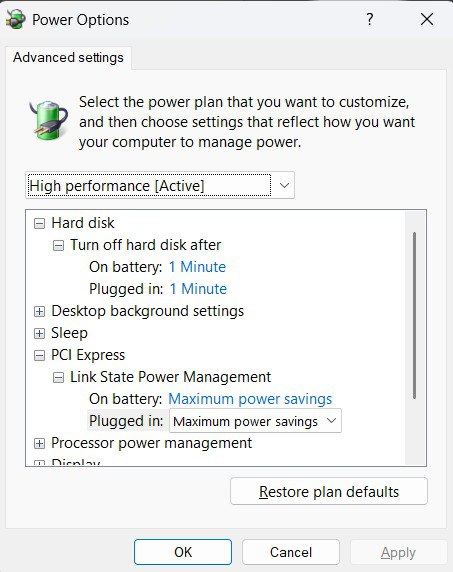
Go to Power Options and change the PCI Express -> Link State Power Management option to be Maximum power savings.
-
Having that option on either Moderate power savings or No power savings will cause the error.
For people who wanna read more on this.
-
Open bug on Ubuntu - NVMe high power state after wake up from sleep.
-
And on why I chose sleep.target over
After=suspend.targetor/lib/systemd/system-sleep/on thesystemdservice: